Get required information for Identity Intelligence
Get the necessary credentials and configuration values from Identity Intelligence to enable integration with the dynamic firewall.
This task discusses how to create an API client, which provides all the get required information to set up Identity Intelligence in the dynamic firewall.
If you already have an API client and you know the values of all these parameters, you can skip this procedure and continue with :
-
Client ID
-
API URL
-
Token URL
-
Client Secret
Before you begin
Integrating with the dynamic firewall requires you to create an API client integration in Identity Intelligence.
Among the values you must know about your API client integration is the client secret, which is displayed when you create the API client only. For that reason you might need to create the API integration first.
For more information about creating an API cilent integration, see Public API.
Follow these steps to get required information for Identity Intelligence:
Procedure
Step 1 | Log in to your Identity Intelligence tenant. |
Step 2 | Click |
Step 3 | Click Add Integration. |
Step 4 | On the next page, under API Clients, click Add API Client. |
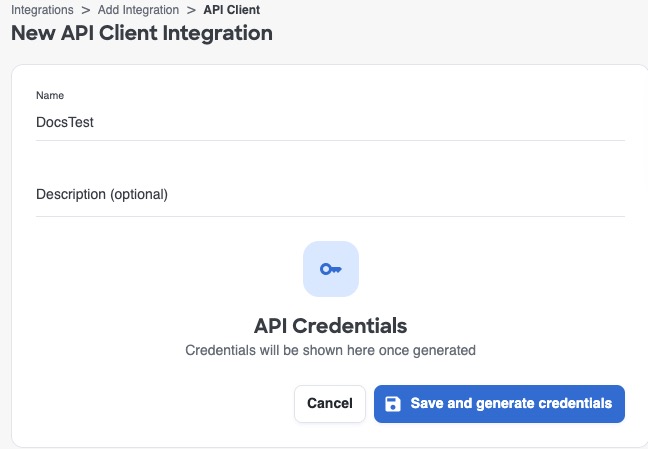
Step 5 | Enter a Name and an optional Description. |
Step 6 | Click Save and Generate Credentials. This figure shows an example.
|
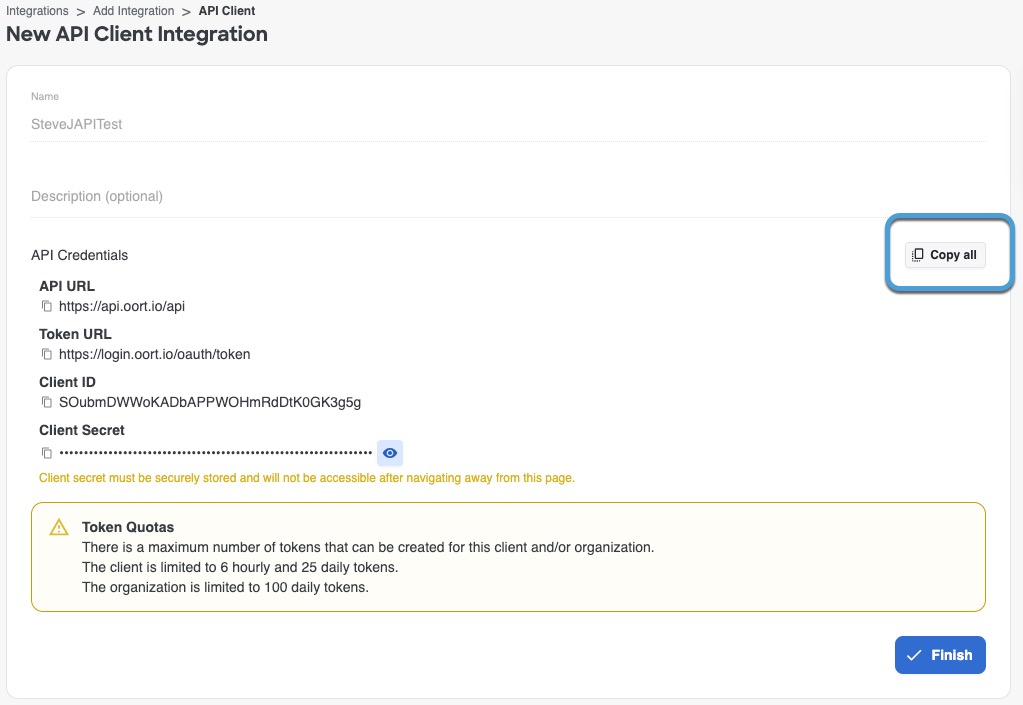
Step 7 | On the next page, click Copy all as this figure shows.
|
Step 8 | Save the credentials for later use. |
Step 9 | Click Finish. |
 (
(