Create a dynamic firewall instance
Create a new instance of the dynamic firewall to establish an association between an identity source and Identity Intelligence.
This task discusses how to create a new instance of the dynamic firewall, which is an association between an identity source and Identity Intelligence.
Before you begin
Complete all these steps:
-
Create an identity source:
-
On-premises Cisco ISE: Ways to configure the Cisco Identity Services Engine (Cisco ISE) identity source
-
Single or multiple Cisco ISE clusters:
-
Follow these steps to create a dynamic firewall instance:
Procedure
Step 1 | If you haven't already done so, log in to Security Cloud Control. | ||
Step 2 | Click Firewall. | ||
Step 3 | Click . | ||
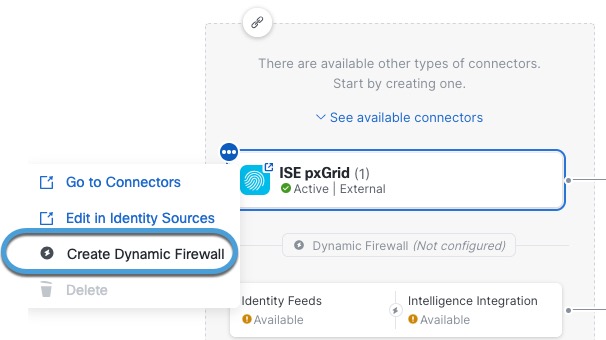
Step 4 | Click The following figure shows an example.
| ||
Step 5 | Click Create Dynamic Firewall. | ||
Step 6 | Continue with Associate an identity source with Identity Intelligence. |
 next to the name of the identity source with which to add the