Use the troubleshoot feature for failed migrations
Use the Troubleshoot feature to identify and resolve issues with failed or partially successful migrations by providing a summary and detailed progress of migration steps.
There might be a few instances where, owing to some issues, the migration fails or is not thoroughly successful. To help resolve issues around such failed or partially successful migrations, you can use the inbuilt Troubleshoot feature.
Procedure
Step 1 | On the migration jobs page, click the |
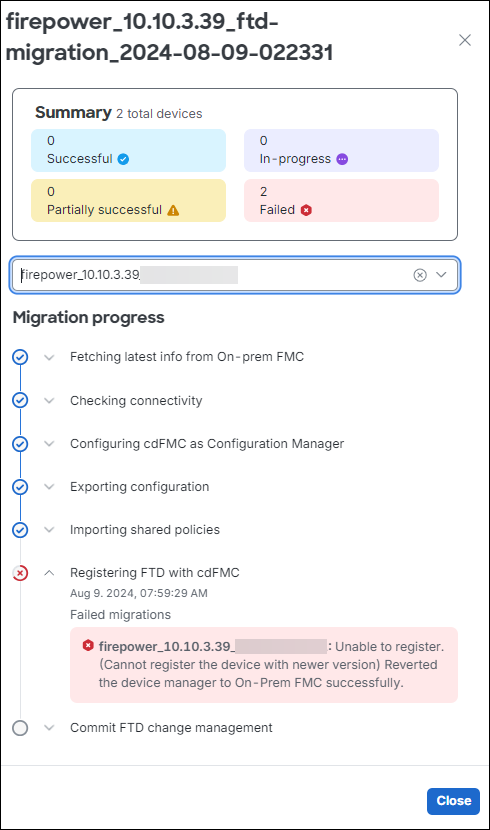
Step 2 | Click Troubleshoot. This opens up a sliding window that contains the following information:
 |
Step 3 | Based on the stage at which the migration seems to have failed, refer Troubleshoot Firewall Threat Defense Migration to Cloud-Delivered Firewall Management Center for information on how to troubleshoot. |
 under the
 The troubleshoot feature provides detailed information about the migration status and identifies the specific step where the migration failed, enabling you to resolve the issue.